
 
Internet on your Dreambox!
Now it is
possible te get the Internet on your Dreambox. By pushing the
blue button, you can get a Internetbrowser on the screen. This
test shows that it's working fine. Some sites won't shown
correctly, because the browser don't support stuff like java,
php.
Download
Here the browser. If the link doesn't work, search with a
searchengine by the keywords "dreambox+browser", or something.
To install the software, please do the following staps:
- Copy the "links" directory to the Dreambox harddisk.
- Copy the files into the "plugins" directory to the "/var/plugins"
directory
from your Dreambox.
- Copy the files into the "tuxbox" directory to the "/var/tuxbox"
directory
from your Dreambox.
- After that, login with a telnetsession to the Dreambox
(start, run, telnet
ip_dreambox). Type than:
- cd /hdd/links
- chmod 755 * (with this command the files will get execute
permission)
- Do this chmod 755 * also in the /var/plugins and /var/tuxbox/plugins
directory.
Need to know, that your Dreambox must has the newest firmware.
Than, there will be come up a menu by pressing the blue
button. Now, here is shown the Internetbrowser.
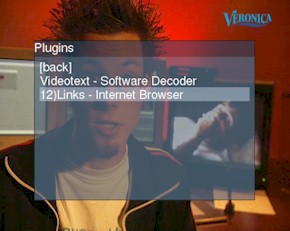
Figure 1: the pluginslist, by
pressing the blue button.
Select this
browser. Press the "ok" button for starting it. The startpage
will be on the screen. Every Internetpage can be used as a
startpage. Edit the "/hdd/links/elinks" file for changing it.
Fill in here the URL from the page that you want to see,
everytime the browser starts up.
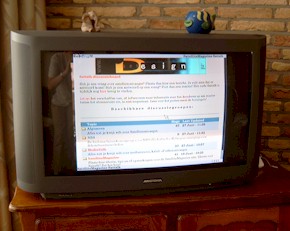
Figure 2: The SatelliteMagazine Sattalkforum on TV!
It's very handy,
to make your own startpage with links of all your favorite
internetsites. So, I made a page with a link to the Sattalk
forum from this site. As you can see in figure 2, it is shown
complete correctly. Very handy for watching if there are some
new messages!
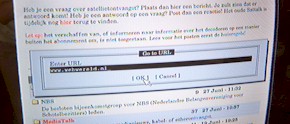
Figure 3: the addresswindow, by
pressing the "4" button.
The mouse cursor
can be moved by the Up/Down/Left/Right buttons from the remote
control. The "OK" button is for "clicking". Even, it is
possible te give up an address, by pressing the "4" button.
There will be shown a new addresswindow. Fill in here the URL.
Very soon, a new Dreambox whireless keyboard will be for sale.
Until thane, you need to type the addresses like SMS style. It
will take awhile! But, it works fine.
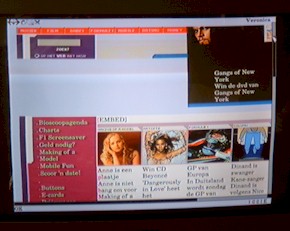
Figure 4: The site from Dutch TV &
radiostation Veronica. Not 100% correctly.
As it is writen in
the Readme file from the browser, is this software at the
moment not perfect. Backgroundpictures, Flash and Java won't
shown. because of this, some sites looks completely different
or aren't available.
Official, this browser is made for Linux. So, it can be work
on the PC. The
development should be continue. Now, it is very nice to
experiment with it. On the other hand, it is very handy for
watching "quickly" on a site for new
updates. Browsing on the TV can't replace the PC, because a TV
has a low resolution.
But: would you like to know what kind of programmes will be on
air on a station that hasn't EPG? No problem. Use the browser!
Pepijn van Rijen
29 juni 2003
<< Back to the Dreambox Center
|
